Picture this. It's Monday morning. Your site manager arrives at 6:45am to open up. By 7:15am, there's already a problem.
Three subcontractors are standing at the gate. Their CSCS cards expired over the weekend. The main contractor's access control system won't let them through. They're being sent home.
You've now got a hole in today's schedule. Work can't start in that area until you find replacements. The client's going to be asking questions. Your programme's slipping on day one of the week.
All because someone's card expired and nobody caught it.
This happens on UK construction sites every single week. Not because site managers are incompetent. Not because workers don't care. But because tracking hundreds of certifications with different expiry dates across multiple sites using spreadsheets and paper folders is fundamentally broken.
The construction industry has a competency management problem. And whilst everyone's focused on skills shortages and recruiting new talent, there's an equally serious issue happening right now: we're terrible at tracking and managing the qualifications we've already got.
Let's talk actual numbers. Not vague "it's inefficient" statements, but real costs that hit your bottom line every month.
Your site manager spends 90 minutes every Monday morning checking everyone's CSCS cards, CITB certificates, and project specific training records across a team of 15-20 workers.
Over a year, that's roughly 75 hours of management time spent on admin that software could do in 30 seconds. At a site manager day rate of £250-£350, you're burning £3,000-£4,500 annually on manual checking. Per site manager. If you're running three sites, triple that.
HSE spot checks are becoming more frequent. If you can't instantly prove that everyone on site is properly qualified and inducted, you're looking at improvement notices, prohibition notices, potential fines of £5,000-£20,000 for serious breaches, and insurance implications.
One prohibition notice costs more than a year's subscription to a proper competency management system.
Worker shows up with an expired card. Gets turned away. You need a replacement.
If you're lucky, you find someone same day. More likely, it's 24-48 hours. On a £400k project with tight margins, even one day's delay can wipe out a week's profit once you factor in penalty clauses and extended preliminaries.
This happens 2-3 times per year on active sites. Each incident costs £2,000-£5,000 in direct costs, plus the reputational damage with the client.
Increasingly, main contractors and clients want to see your competency management systems during PQQ stages.
If you can't demonstrate robust digital tracking of worker qualifications, training records, and compliance status, you're getting knocked out before price is even discussed.
We've seen regional contractors lose out on £2M+ framework opportunities because their answer to "How do you manage workforce competency?" was essentially "We have spreadsheets and a filing cabinet."
That's not good enough anymore.
The compliance landscape has changed. What you could get away with five years ago doesn't fly anymore.
Clients are asking harder questions. PQQs now include detailed questions about how you manage workforce competency. What systems do you use? How do you track expiry dates? How do you verify subcontractor compliance? "We have spreadsheets" is increasingly getting tenders rejected at the first stage.
Access control is becoming standard. More sites are using proper access control systems now. CSCS card readers on turnstiles. Facial recognition. Digital check-in systems that verify qualifications before allowing site access. Your spreadsheet can't integrate with these systems.
HSE inspections are more thorough. When an HSE inspector shows up and asks to see competency records for everyone on site right now, can you produce them within five minutes? If you're scrambling through folders or spreadsheets, the inspector's writing notes. Those notes turn into improvement notices.
Insurance companies want evidence. Some insurers are actively offering premium reductions for companies with demonstrable digital competency management. More importantly, if you have an incident and the insurance company investigates, "We think he was qualified but we can't find the certificate" doesn't protect you.
Subcontractor management is your responsibility. If you're a main contractor, you're responsible for everyone on site. Asking each subbie to send you a spreadsheet of their workers' qualifications doesn't work. You need visibility across everyone working on your projects, regardless of who employs them.
Competency management isn't just storing CSCS cards in a folder. It's a complete system for ensuring everyone on your sites is qualified, trained, and legally allowed to do the work they're doing.
In the UK construction sector, this involves tracking:
CSCS cards - Different colours for different roles (Green for labourers, Blue for skilled workers, Gold for advanced craft, Black for managers). These expire and need renewing.
CITB certifications - SMSTS (Site Management Safety Training Scheme), SSSTS (Site Supervisor Safety Training Scheme), and various other courses. Each has different expiry dates.
Trade-specific qualifications - Gas Safe for heating engineers. NICEIC for electricians. CPCS for plant operators. Each has its own renewal cycle.
Health and safety training - First aid. Fire marshal. Manual handling. Asbestos awareness. Working at height. Every course has an expiry date.
Site inductions - Every worker needs inducting onto every new site.
Method-specific training - Working in confined spaces. Hot works. Scaffold erection.
Client requirements - Some clients have additional training mandates. Crossrail projects. Nuclear sites. MOD work.
Expiry monitoring - Every certification has an expiry date. Tracking hundreds of workers across multiple sites, each with 5-10 certifications that expire at different times, is impossible manually at scale.
Gap analysis - If you need someone with confined space training for a job starting next week, can you identify who's qualified in under a minute?
Training records - Complete history of every course every worker has done. Essential for proving competency in case of incidents.
That's potentially 10-15 different certifications per worker. Across 30 workers, you're tracking 300-450 individual certifications. Add subcontractors and you could be tracking thousands.
Here's why spreadsheets fundamentally fail for competency management:
No real-time visibility - Your site manager's looking at a spreadsheet that was last updated three weeks ago. Meanwhile, two CSCS cards expired last Thursday and nobody knows.
No access control integration - Modern construction sites use access control systems. Your spreadsheet can't talk to these systems. So you're manually cross-referencing, which defeats the entire point.
No accountability or audit trail - Who updated the spreadsheet? When? What changed? If there's a compliance investigation after an incident, can you prove that worker X had valid certification Y on date Z?
Subcontractor management is impossible - You're a main contractor with 15 subcontractors on a project, each with 5-20 workers. That's 75-300 people whose competency you're responsible for verifying. Are they going to send you updated spreadsheets every week? No chance.
Human error (the big one) - Someone forgets to update the spreadsheet. Someone types the wrong expiry date. Someone deletes a row by accident. Someone's working from an old version saved on their laptop. Every single one of these happens regularly with spreadsheet-based systems.
The construction industry has caught up. Proper competency management systems exist, they're affordable, and they actually work.
Here's what best-in-class looks like in 2026:
Every worker has a digital profile containing personal details, photo and ID verification, complete training history, all current certifications with expiry dates, site induction records, and employment history. This profile follows them across projects and companies.
The system knows when every certification expires. It sends automated alerts at 60 days, 30 days, 7 days before expiry, and on the expiry date. This prevents the "oops, my CSCS card expired last week" situation that costs you delays and money.
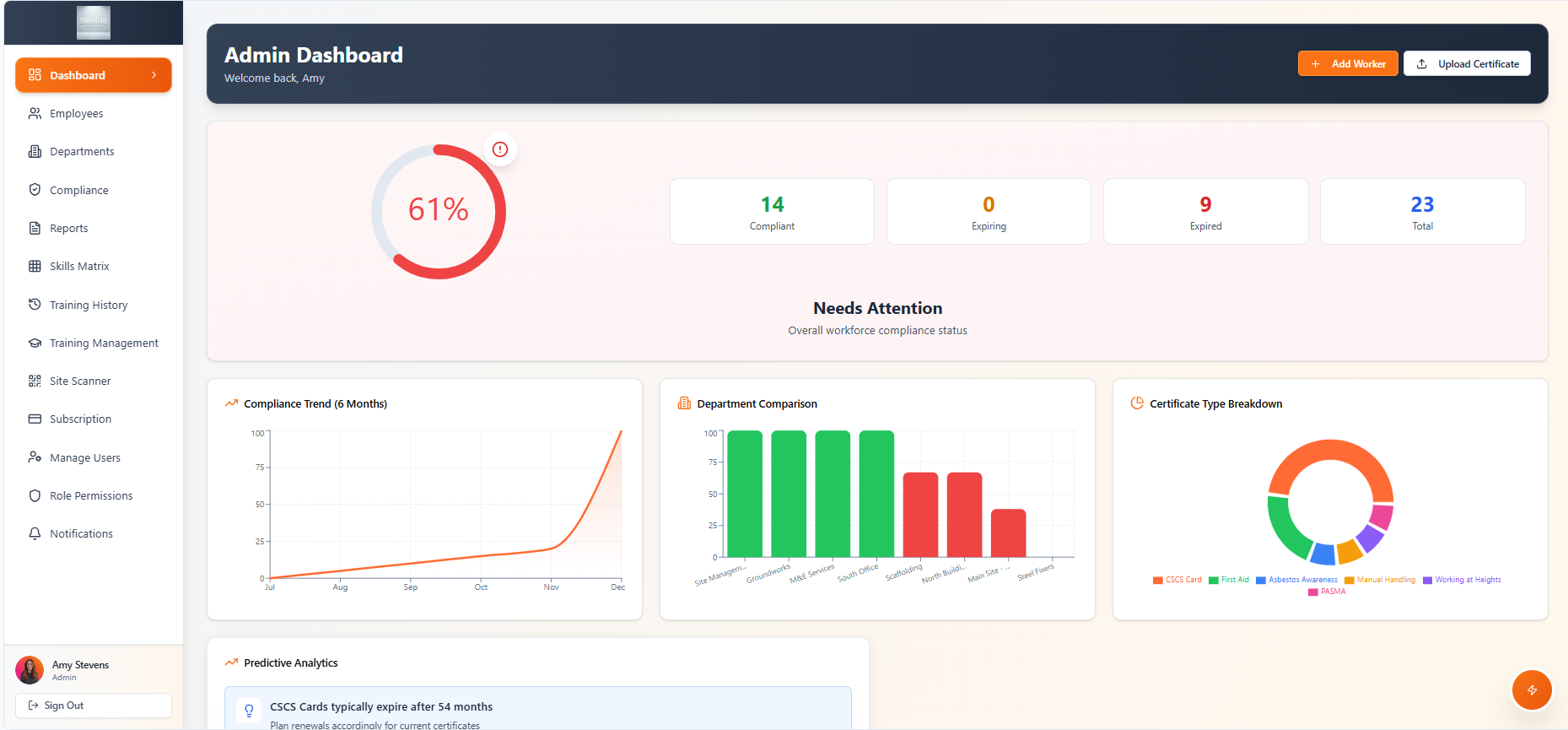
Site managers see at a glance how many workers are fully compliant (green), how many have certifications expiring soon (amber), and how many are non-compliant (red). This turns competency management from reactive firefighting into proactive planning.
Workers download an app where they can view their certification status, upload new certificates as they complete training, complete digital site inductions before arriving on site, and receive notifications about expiring certifications. This shifts responsibility to workers whilst giving management oversight.
When a worker scans their card at the site gate, the system checks their profile in real-time, verifies all required certifications are valid, confirms site induction is complete, and either grants access (green light) or refuses entry (red light). All happens in under 2 seconds.
Need to prove compliance to a client? Generate a report showing all workers on site on a specific date, their qualifications and training status, and audit trail of who approved site access. This transforms audits from stressful scrambles into five-minute exports.
Invite subcontractors to the platform. They manage their own workers. You get visibility across everyone without the admin burden. Set minimum requirements for your project. System automatically flags any subcontractor workers who don't meet them.
We're Bright Kru Construct. We work exclusively with construction firms on digital solutions. Competency management kept coming up as a massive pain point, so we built Compliance Pro specifically to address it properly.
Here's how it works in practice:
Worker downloads the app. Takes a selfie. Uploads their CSCS card, CITB certificates, and any other qualifications. Done.
The system uses OCR (optical character recognition) to automatically extract expiry dates and certification numbers from uploaded documents. No manual data entry required.
Compliance Pro integrates with the CSCS SmartCheck API. This means we can verify CSCS cards in real-time against the official CSCS database. No more accepting fake cards.
Different projects have different requirements. Compliance Pro lets you set these at project level. Workers assigned to each project can't access that site until they meet ALL requirements. System enforces this automatically.
No more standing in a portakabin for 90 minutes watching PowerPoints. Workers complete site inductions on their phone before arriving. Videos, photos, quizzes. Takes 15-20 minutes.
System tracks completion. They can't access site until induction is done. Saves hours of site time. Workers arrive ready to work.
Workers see their own profile, certifications, upcoming training needs, sites they're approved for.
Site managers see everyone on their site, compliance status, who's due to expire soon, skills matrix showing who can do what.
Directors see company wide compliance metrics, risk indicators, training spend vs budget, competency gaps across the business.
Clients (if you give them access) see that everyone on site is compliant, giving them confidence in your systems.
Pre-populate PQQ responses with actual data from the system. Generate compliance reports for specific date ranges. Prove who was on site and that they were qualified. Export training matrices showing all workers and their qualifications.
Invite subcontractors to Compliance Pro. They manage their own workers. You see everyone in one system. Set minimum requirements. System won't let non-compliant workers access your sites.
Your site manager used to spend 90 minutes Monday morning checking everyone's cards. Now they check the dashboard. Green across the board? Everyone's compliant. Job done in 30 seconds.
That 90 minutes is now spent on actual site management. Planning the week's work. Briefing teams. Inspecting previous week's work.
Workers arrive. Scan card or face at turnstile. Green light, they're in. Red light, they're refused and automatically notified why.
No more gatehouse delays. No more manual checking. Time saved: 5-10 minutes per worker per day. Across 20 workers, that's 100-200 minutes of productive site time recovered daily.
Your client asks to see compliance status for their project. Instead of "I'll get back to you in a few days," you send them a live dashboard link. They can see in real-time that 100% of workers on their project are fully compliant.
This builds confidence. You start being seen as professional and organised.
PQQs that used to take 3-4 hours to complete now take 30 minutes. Pull reports from the system. Copy data into PQQ template. Submit.
More importantly, you're not saying "We manage competency through spreadsheets." You're saying "We use Compliance Pro, a digital competency management system that provides real time visibility across all sites and workers."
HSE inspector shows up. You pull up the platform. Filter by current site. Export to PDF. Hand it over.
Complete certification history for all workers currently on site. Audit trail showing when each person was inducted. Evidence that systems were functioning correctly. Total time: five minutes.
Compliance Pro implementation actually works like this:
Week 1: System setup - We configure the platform for your business. Takes 2-3 hours of your time across a few video calls with us. We do most of the heavy lifting.
Week 2: Worker onboarding - Send workers a link. They download the app. Upload their certifications. Most workers complete this in 15-20 minutes. We typically see 70-80% completion within the first week.
Week 3: Site integration - Connect CompliancePro to your access control systems (if you have them). Usually a simple API integration.
Week 4: Full operation - System's live. Workers are managing their own certifications. Site managers have visibility. Automated alerts are working. Reporting is available.
Total elapsed time from decision to full operation: one month. Actual time requirement from you: 5-8 hours spread across the month.
We migrate one site first. Test everything thoroughly. Make sure it works before rolling out company wide.
If something doesn't work, you've still got your spreadsheets as backup. Nothing breaks. No risk to live operations.
Once the first site is running smoothly (usually 2-3 weeks), we roll out to the rest.
If you're evaluating systems, here's what matters:
Built for construction specifically - You need a platform designed specifically for UK construction. One that understands CSCS cards, CITB training, CDM regulations, and the complexity of site-based work.
Actually simple to use - Site managers don't have time to learn complex software. Workers won't use clunky apps. If the demonstration requires extensive explanation, it's too complicated.
Actual integration with access control - Real integration means the worker scans their card, access control checks the platform in real-time, and a decision is made in under 2 seconds. No manual CSV exports or imports.
Handles subcontractor management properly - The platform should let subcontractors manage their own people whilst you get visibility across everyone in one dashboard.
Real automated alerts - The system should send notifications without any manual intervention. Worker's card is 60 days from expiry, they get a text and email automatically. Zero manual checking required.
Proper reporting capabilities - Reports should be generated in under 30 seconds, exportable to PDF and Excel, customisable, and professional quality.
Most construction companies know their current approach to competency management isn't great. But they don't change. Here's why:
"We've always done it this way" - Meanwhile, your competitors are implementing platforms. They're becoming more efficient. They're winning tenders you're losing. Familiarity is comfortable. It's also expensive.
"We'll sort it out when we're less busy" - There's always a reason to delay. Next month becomes next quarter becomes next year. Every delayed site access costs you. Every compliance failure creates liability. Every tender lost is revenue you'll never get back.
"It sounds complicated to set up" - Modern platforms are designed for fast deployment. Most construction companies are fully operational within 2-4 weeks. But the perception of complexity prevents even investigating options.
"Our team won't use it" - Workers use smartphones for everything else. A simple app that shows their own qualifications and sends them reminders? They use that. It benefits them directly.
"We don't have budget this year" - Poor competency management costs money every single week. Site delays. Admin time. Compliance failures. Lost tenders. Most construction companies find that proper systems pay for themselves within weeks through avoided costs alone.
Construction's getting more regulated, not less. Clients want evidence of robust systems. HSE inspections are more thorough. Insurance companies are asking harder questions. Main contractors need visibility across their supply chain.
You can keep managing this with spreadsheets and folders. It'll keep costing you time, money, delays, and opportunities. Or you can implement proper systems that actually solve the problem.
This isn't about chasing the latest tech trend. It's about having infrastructure that supports your business rather than creating friction.
Workers should be building, not hunting for certificates. Site managers should be managing sites, not doing admin. Office staff should be running the business, not chasing spreadsheets.
Proper competency management platforms make all of that possible. They turn compliance from a constant headache into something that just works in the background.
If you're serious about growing your construction business, at some point you need systems that scale. You can implement them now, whilst you're still managing. Or you can wait until manual processes have completely broken down and you're forced into it by crisis.
Most companies find that earlier is better.
Compliance Pro was built specifically to solve competency management for UK construction companies. We understand the problem because we work in this industry every day.
If you're tired of chasing certificates, dealing with site access problems, and worrying about compliance gaps, maybe it's time to look at what's actually possible with proper systems.
Want to see how Compliance Pro handles construction competency management?